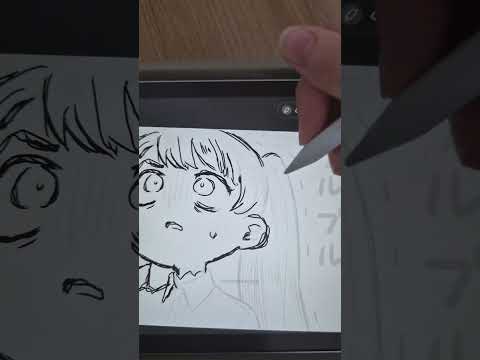
draw. It moves. Instantly. Doodraw is a drawing app where every stroke animates the moment you draw it. iPhone, iPad and Android.

iPad with Apple Pencil showing Doodraw drawing canvas

how it works.

Three steps, and you only do the first one.

  1. Draw

    Pick a brush and draw with your finger or a stylus. No keyframes, no timeline.

  2. It moves

    Every stroke starts wiggling the moment you draw it, like a hand-drawn cartoon.

  3. Export anywhere

    MP4, GIF or animated PNG, with a transparent background if you want one.

what's inside.

A real drawing app first. The motion comes with every line.

made for.

What people actually make with it.

people noticed.

Our most watched Shorts, and what people wrote under them.

See all our Shorts on YouTube →

free or pro.

Free to draw, animate and export. Pro when you want more.

Free

$0

Forever. Exports carry a small doodraw.com mark.

Download free
  • Draw, animate and export
  • 16 animated brushes
  • Layers, lasso, fill and eyedropper
  • Image import
  • GIF, MP4, animated PNG, PNG and JPG, up to 1080p
  • Transparent background
  • Unlimited projects

Pro

Billing

$3.99 / month

Billed every month. Cancel anytime.

Get Pro in the app

$22.99 / year

7 days free, then billed yearly. 52% less than monthly.

Try Pro free for 7 days

$44.99 once

Pay once, keep Pro for good.

Get Pro in the app

Everything in Free, plus:

  • No watermark on any export
  • 10 more brushes, like Charcoal, Watercolor and Glitch Ink
  • Frame by frame with onion skin
  • Animation speed and strength per layer
  • Progressive drawing export

US prices, shown in your own currency in the store. You upgrade inside the app, and cancel from your App Store or Google Play settings. Pricing questions

Compare every feature
What Doodraw Free and Doodraw Pro include
Feature Free Pro
Draw, animate and export ✓ ✓
Animated brushes 16 brushes: pens, crayon, neon, chalk, paint and more All 26, adding Charcoal, Watercolor, Fresco, Wet Acrylic, Glitch Ink and 5 more
Brush settings and favorites ✓ ✓
Layers with opacity, blend modes and lock ✓ ✓
Eraser, lasso, fill bucket and eyedropper ✓ ✓
Image import ✓ ✓
Unlimited projects ✓ ✓
GIF, MP4, animated PNG, PNG and JPG, up to 1080p ✓ ✓
Transparent background ✓ ✓
Watermark on exports Small "doodraw.com" in the corner None
Frame by frame with onion skin ✕ ✓
Per-layer animation speed and strength ✕ ✓
Progressive drawing export ✕ ✓

guides.

Tutorials and honest comparisons from the blog.

All articles →

questions.

Does it work on Android?
Yes. Doodraw is available on Android through Google Play, and on iPhone and iPad through the App Store.
Is it free?
Yes. Doodraw is free to download, and drawing, animating and exporting cost nothing. Free exports carry a watermark. The optional Doodraw Pro subscription removes it and adds exclusive animated brushes, advanced layer animations, an animation assistant with onion skinning, and progressive drawing export.
Can I export transparent GIFs?
Yes, on the free version too. In the Doodraw export settings, turn on Transparent background and your GIF comes out with no background, ready to use as a sticker or overlay. For smoother edges, choose Animated PNG, which keeps full transparency.
Is it AI?
No. Doodraw uses no AI. You draw every line yourself, and the Doodraw animation engine makes each stroke wobble like a hand-drawn cartoon, live as you draw. Nothing is generated for you.
Do I need an Apple Pencil?
No. You can draw in Doodraw with your finger on iPhone, iPad and Android. A stylus such as the Apple Pencil works too, and a stylus-only setting lets you rest your hand on the screen without leaving marks.
Do I need to know how to animate?
No. Doodraw has no keyframes and no timeline. You draw, and every stroke starts moving on its own. If you want more control, Doodraw Pro adds an animation assistant with frames and onion skinning.
All questions →

get doodraw.

Free on iPhone, iPad and Android.